zebra label printer not printing

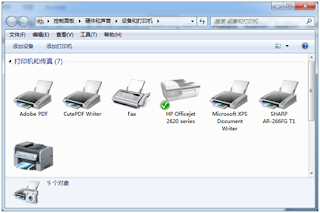
GK888T zebra Label Printer not printing If the Printer does not print after clicking “Print”, it has below several causes: 1, Label Printer install error, Please check whether the USB cable and power cord is well connected and the power switch is on. Check the ribbon or Label is installed right. (Please see the installed video of GK888T). 2, point out errors by Task Status. 2.1, Check the printer driver icon status and the print task status to diagnose a), Click “ Start ” and select “set”-----“Devices”----- “ Devices and Printers ” . b), Click “ZDesigner GK888t” printer and right click “See what’s printing”. Click “Printer” and check whether “Use printer offline” is selected, if it is, then cancel it. c), Wrong port is selected in the driver. Right click the printer driver icon, select “ Printer Properties ” , and correct the “ Port ” selection under the “ Port ” tab. You can try to selection the U...

This comment has been removed by a blog administrator.
ReplyDeleteBạn đang tìm kiếm trên google: máy in sớ, bạn cần mua máy in sớ để phục vụ công việc của mình, bạn chưa biết nên mua máy in sớ ở đâu đảm bảo chất lượng tốt, giá thành phải chăng. Tôi xin giới thiệu đến bạn địa chỉ mua máy in sớ tốt nhất đó là: máy in 247
ReplyDeleteXem chi tiết tại: Máy In Sớ Canon HP Bản In Đậm Rõ Nét, Giá Rẻ
Địa chỉ: Số 9/36 Nguyễn Viết Xuân, Thanh Xuân, Hà Nội
Map: https://goo.gl/maps/ziJ2DLcT7MMX2Esf7