Posts

How to configurat the WIFI Mobile Receipt Printer By IE.
Image
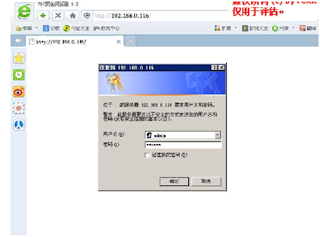
Prepare The WIFI Mobile Receipt Printer  default setting below: WIFI Name: "wifi-socket" Default IP address: 192.168.1.100 User name:" admin" Password:"000000" Tools: WIFI.Printer.PC.exe PrinterDEMOWIFI.apk 1, First, Let your WIFI mobile receipt Printer power on.  you can find the WIFI name "WIFI-SOCKET" on your computer after a few seconds. If you can find the WIFI Name, you can connect this WIFI name. 2,  Open your IE browser and access the WIFI Mobile Receipt Printer IP address "http://192.168.1.100".it will be pop-up a small window. type the user name:"admin"and the password"000000"----Click the "OK" 3, After you loaded it in, you can see below images website. This Wifi Mobile receipt Printer can support two type working mode 1, AP Mode, 2 STA Mode. What is the AP Mode, AP means Wireless access Point, you can use any computer to connect the this Mobile receipt p...
How to fix the driver of thermal Printer fail to install

Image
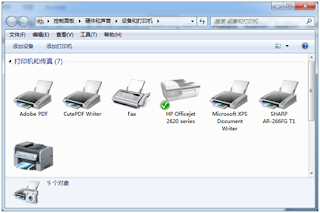
How to fix the driver of thermal Printer fail to install  After you install the Thermal printer http:\\www.hsprinter.com  driver, but the "devices and Printer" cannot find out your printer which your installed. now you can according to blow article, 1, open the devices and printer like below images: 2, Click "Add Printer" and choose the " add local printer" Next step. 3,Choose the Prot, and click next step. you should notice that if you printer is USB interface, you should choose the USB port. and what's your printer port, you should choose what's port.  4,Click the "from disc install" 5, Choose the "Browse" 6,Browse from "My Computer"-"C" Disk--- 7,Double-Click the "Xinye Pos Printer Driver" 8,Choose your right OS type"x86 or X64 bits" 9, Continue choose the .inf File and click "open". 10, Chose the ...

Welcome to HSPOS BLOG

here is hspos blog blog, we will submit a lot of technology manual. If you have any issue, you can contact us anytime